Internet over the 220 V power grid? Why not?
20. 5. 2020
Not every split is the same... Do you know anyone who would want a divorce these days? If so, you would probably say they are crazy. How many years did that solid union last them? And now? Don't even ask! Such a split usually involves a lot of trouble, worries, paperwork and running around the courts. It won't do your sleep any good either, and it costs considerable sums of money. You also have to put a lot of energy into such a split. The tension of how it will all turn out. The expectation of whether both opposite poles will be properly satisfied. When it is all over, everyone is totally drained and really needs to recharge their batteries. It may sound rather crazy, but we know of a split with which almost everyone will be happy.
And from the heading it is clearer than day that our double meaning refers to the "rozvod" (a word that means both "divorce" and "wiring") of the internet via 220 V electrical sockets.
TIP: Having trouble with your connection and not sure what to do next? Also read our article What to do when your internet is not working.
When Wi-Fi is straight out of sci-fi
A fairly common way to extend your existing internet connection to more rooms at home is classic Wi-Fi, that is, a wireless setup. When Wi-Fi is for some reason unreachable or unsatisfactory, most people usually reach for a cabled option. But what if you do not want or cannot run a cable around the house? Drill into the wall? Oh, the horror! Install unsightly plastic trunking? Never!
There is, however, one option. How about using the existing electrical wiring? It can provide both reliable transmission of electricity and, at the same time, data. Data packets are transmitted at high frequencies. Electrical wiring needs no extra cables, does not spoil the interior, so your aesthetically minded ego does not suffer. That is another plus.
How internet over electrical wiring works
Setting up the connection itself is very easy, and you only need powerline adapters and a cable. Connect one of the adapters to your modem with a network cable and plug it into any socket. Then plug the second adapter in somewhere else in the flat. Basically this connects two devices, but it is no problem to buy more later and connect up to six of them.
All you then need to do is press a button on them, so that the connected devices pair with each other. There is actually nothing to configure, and since the devices have no administration interface at all, there is no way to do so either. Installing all the components and connecting them is therefore trivial, and even a layman can manage it.
Selected models can themselves become active Wi-Fi elements, or two computers can be connected to each other via network cables. Communication between the devices is secured with 128-bit AES encryption.
Advantages of internet carried over electrical wiring
This technology, which enables data transmission over electrical wiring, is called PLC, short for Powerline Communication. It is a technology that first appeared several decades ago. That does not mean it is terribly outdated, though. On the contrary: thanks to technological progress, ever more sophisticated adapters are being developed. Thanks to the growing throughput of networks and higher nominal transmission rates, the volumes of data that can be transferred in a reasonable time are also increasing (up to 300 Mbps). In many cases it is a far more suitable alternative to a Wi-Fi signal where the signal would not get through building obstacles, or where the spectrum is heavily used and the transmission speed drops due to mutual interference.
Do powerline connections have sufficient speed and stability?
It depends on the circumstances. In general, a cable connection is less problematic, more stable and less costly. Wi-Fi is problematic, for example, in reinforced concrete structures of panel buildings, which can negatively affect the spread of the signal, or in buildings with thicker walls, through which the signal also struggles to penetrate.
In panel buildings, the powerline solution generally delivers a satisfactory speed, comparable to that of Wi-Fi. And you need not fear that an expensive renovation awaits you, even if you still have old aluminium wiring in your flat. You do need to bear in mind, though, that things can get complicated when you want to create a network for a whole apartment block, for example. The 220 V wiring has to be on the same phase in every flat. The powerline network can be disturbed by various appliances, such as a washing machine or a vacuum cleaner. The quality of communication between routers can also be affected by the fuses placed in front of the flat.
The range stated by the manufacturer is roughly
Purchase and other additional costs
With the mass spread of powerline adapters, prices have also fallen. With the cheapest set containing two stations, you can get by for an amount not exceeding CZK 1,000. However, you have to accept that they will not be able to communicate with each other at a speed higher than 200 Mbps.
The energy efficiency of these devices has also improved significantly. An adapter requires 4 W when active, but it can switch to sleep mode when there is no network traffic. Then its consumption drops to 0.5 W.
And that is all. All you have to say is "Simsalabim", and suddenly you have a reliable, high-speed computer network for your home, which you have managed to build at minimal cost. Certainly lower than what a real rewiring would cost you.
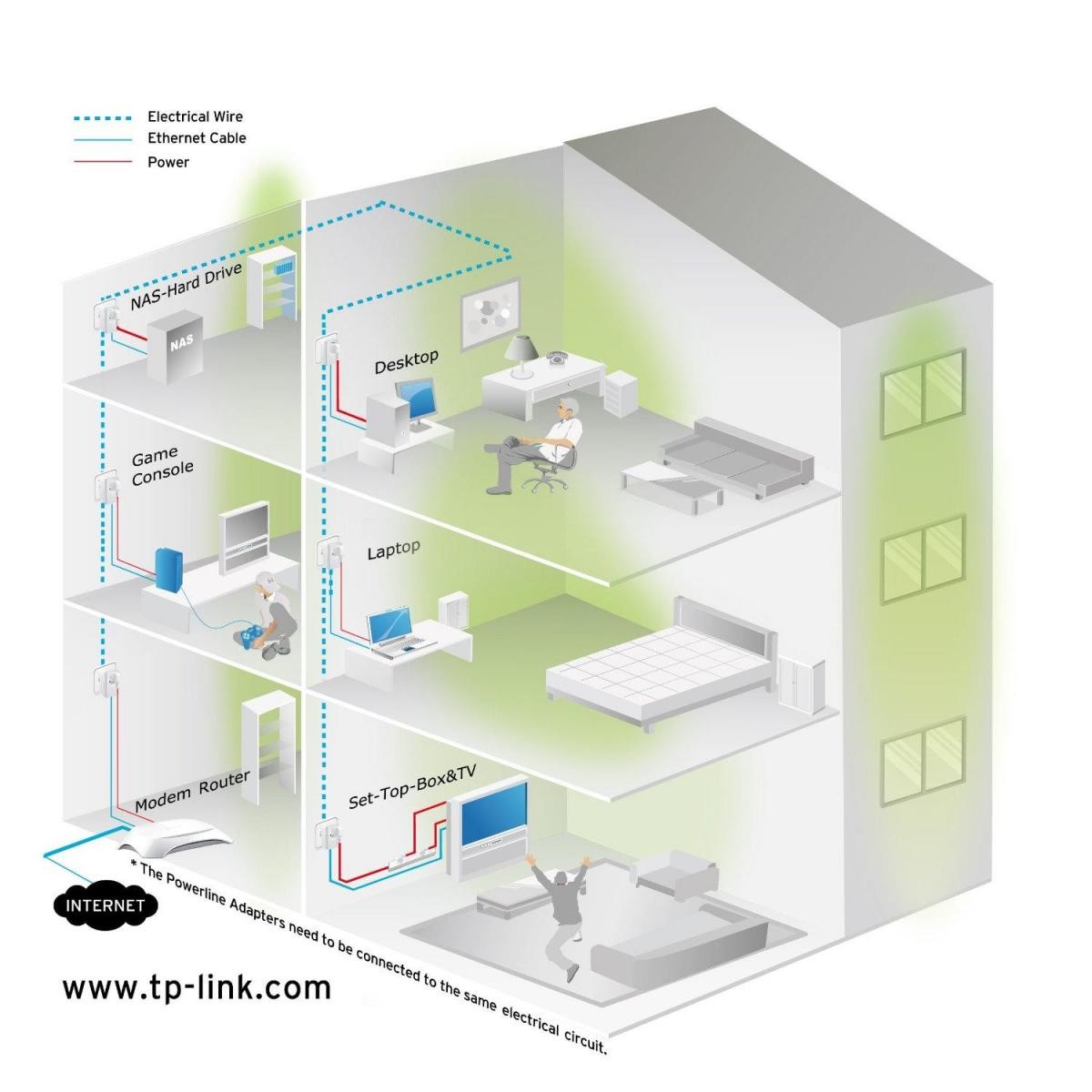
Example of installation and use:
A two-storey house with a brick block construction and ceilings made of reinforced concrete lintels. In the living part of the house there is a wireless router with the 2.4 and 5 GHz bands. Elsewhere in the house there is another room used as a study, where the desktop computers are equipped with Wi-Fi modules, and there is also a multifunction printer and scanner. The devices work in network mode, but do not have a Wi-Fi module.
On the upper floor are the living rooms and the bedroom. The Wi-Fi router's signal reaches up here, but it is weak and unsuitable for running IPTV cable television. The smart TV, however, can connect to the internet directly by cable. How to get out of this?
For example, a PLC device from TP-Link, the TL-PA4010, is plugged into a 220 V socket next to the home connection's router and connected by cable to the router's LAN port. You plug another device into the socket where the device in the study is connected. Pairing happens automatically: after pressing the button on the module at the data source, you just need to calmly walk to the study and press the same button on the other module. And in the same way you connect the TV in the living room on the upper floor, and perhaps some other devices too.
Practically every IT device manufacturer has come out with Powerline devices for the home. But only a few generations are truly reliable and require no fiddly setup or maintenance. And the recommendation for the TP-Link TLPA4010 comes from the connection providers Eurosigal, UVT and Újezd.net. Even a little girl can handle the installation. The communication is really limited only by the speed of the port, at 100 Mbps, and I think a reasonable limit is operating five fully used devices at once.
Updated 16 February 2024