Skip to content

How to change your Wi-Fi password

Internet

20. 1. 2024

how to change the Wi-Fi password

 Struggling with the default Wi-Fi name and password from the manufacturer or provider? Are you worried that someone could crack your password, or do you simply want to restrict access to your Wi-Fi from mischievous children? We are happy to show you how to change your Wi-Fi password, using a few examples.

Connect your router/modem to your computer using an Ethernet cable, or connect via Wi-Fi.

To change the settings, you need to log in to the administration of your modem or router. You do this by entering the IP address of this device into a web browser and entering the relevant user name and password. This IP address is usually found on the underside of the device, or you can use the command line, where you type "cmd" and select Command Prompt. Then use the command "ipconfig" to find the Default Gateway and enter it into your web browser.
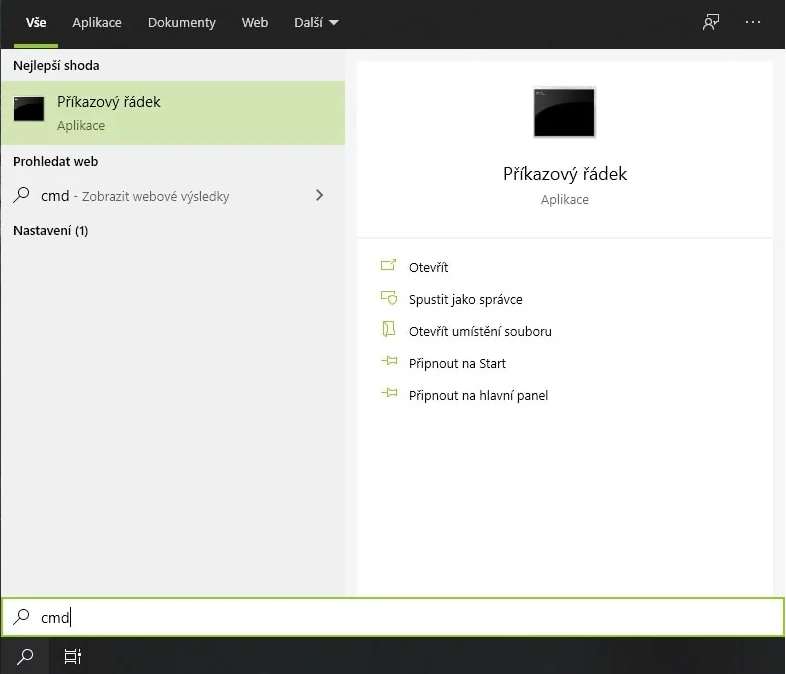
cmd

TIP: The most common addresses are http://10.0.0.138/, http://192.168.0.1/ and http://192.168.1.1.
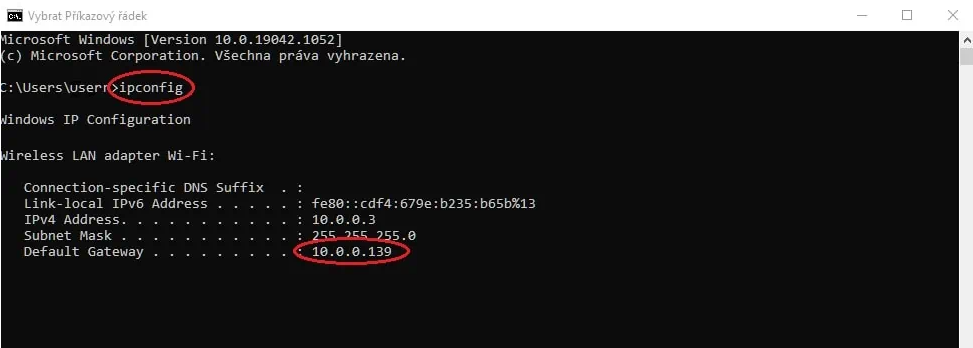
ipconfig - how to change your Wi-Fi password

Once you enter the IP address, a login window appears, where the login details are usually shown, which may also be on the underside of the router/modem. In the factory settings, the user name and password are often both "admin". For security, however, internet providers usually change at least the password, so if you have internet from us, just call us on 227 023 023, or e-mail [email protected]

TIP: Also read our very popular article How to improve Wi-Fi signal at home

The settings may vary depending on the manufacturer and model of the device. You will usually change the Wi-Fi name (SSID) in the WLAN or Wireless category, while you change the password in the Security subcategory.

Our colleague Vorel has prepared instructions for individual devices on the page https://uvtnet.cz/en/support/guides-and-videos/, or alternatively at https://nejpripojeni.cz/navody/jak-zmenit-jmeno-a-heslo-wi-fi/

Examples of specific routers

  • TP-Link TL-WR841N: IP address http://192.168.1.1/, and the user name and password are usually both "admin".
  • Comtrend VR-3031eu: IP address http://10.0.0.138/, with a similar procedure to TP-Link.
  • ZTE H267A: Logging in works similarly to Comtrend; the login details can be found on the underside of the modem.

The Wi-Fi name should not contain diacritics, and the password must contain at least 8 characters and also not contain diacritics.

With this simple procedure you can change your Wi-Fi password to suit your preferences. 

You might also be interested in

Show all

The cheapest internet TV
Internet

15. 4. 2024

The cheapest internet TV

Whole article
The most accurate internet speed measurement
Internet

2. 4. 2024

The most accurate internet speed measurement

Whole article
What is DNS and how does it work
Internet

27. 3. 2024

What is DNS and how does it work

Whole article
How the internet gets to your home
Internet

27. 3. 2024

How the internet gets to your home

Whole article
Where to watch Formula 1?
Internet

1. 3. 2024

Where to watch Formula 1?

Whole article
Fixed internet for your home
Internet

20. 2. 2024

Fixed internet for your home

Whole article
When did the internet start in the Czech Republic
Internet

9. 2. 2024

When did the internet start in the Czech Republic

Whole article
Accurate internet speed measurement
Internet

29. 1. 2024

Accurate internet speed measurement

Whole article
Expansion of fibre networks
Internet

25. 1. 2024

Expansion of fibre networks

Whole article
Official internet speed measurement – 2024
Internet

23. 1. 2024

Official internet speed measurement – 2024

Whole article
Why choose a local internet provider?
Internet

11. 1. 2024

Why choose a local internet provider?

Whole article
Challenges of building fibre networks in the Czech Republic
Internet

12. 12. 2023

Challenges of building fibre networks in the Czech Republic

Whole article

Check address availability

Fill in a few details and we will check straight away whether a connection is available at your address.

Your building does not have an address yet?

By sending your contact details, you agree to the  processing of personal data .

Check GPS coordinates

Fill in a few details and we will check straight away whether a connection is available at your location.

Section circle 1
Section circle 2
Section circle 3
Section circle 4

You can order right away online or leave us your contact details and our operator will take care of everything with you.

Fill in a few details and we will check straight away whether a connection is available at your address.

Address verified:

We have found you, but we will need to check availability manually. Leave us your contact details and we will get back to you as soon as possible.

Fill in a few details and we will check straight away whether a connection is available at your address.

Your address: