How does the internet work on trains?
21. 5. 2020
More and more people travel by train these days. One of the reasons why managers prefer it to driving is the time they can use effectively for work, and an internet connection is an essential part of that. On some routes we can hardly remember when there was no Wi-Fi on the train, and it seems like an absolute matter of course to us. Elsewhere, we can't connect no matter what we do. So how does the internet on trains actually work?
TIP: Also read our favourite article Internet in the clouds

The beginnings of internet on trains
Bringing internet to trains was already being seriously discussed in the Czech Republic in 2008. Initial testing was planned, and both technological options and funding were debated. The main player in this initial phase was Czech Railways (České dráhy). However, the first carrier to offer Wi-Fi on its trains was RegioJet, right from the start of its services in 2011. Passengers could connect to the internet for the first time on the route from Prague to Ostrava.
Czech Railways eventually launched internet on trains with its Wi-Fi in the Pendolino project, which work on began in 2011. In July 2012, the connection was introduced in first-class carriages on CityPendolino trains, also on the route from Prague to Ostrava. Users could connect via CDMA or EDGE networks. From November 2012, passengers on the same route could also start using the internet on the new lines run by the company Leo Express.
Current situation (at the time of writing)
Private carriers have offered Wi-Fi connections on their trains as standard for several years now, and Czech Railways is now following suit. Passengers can use the internet on roughly six hundred trains. However, there are still plenty of routes outside the main corridors that have inadequate coverage. Trains with Wi-Fi access are now marked in the timetables by Czech Railways.
Services from all three main operators are used – O2, T-Mobile and Vodafone – as well as the transmission technologies they offer (LTE, UMTS, GSM, EDGE). On trains you will probably also find that some websites are blocked, mainly those that would put a heavy load on the connection (video streaming and the like) and sites with prohibited content.
How onboard Wi-Fi works
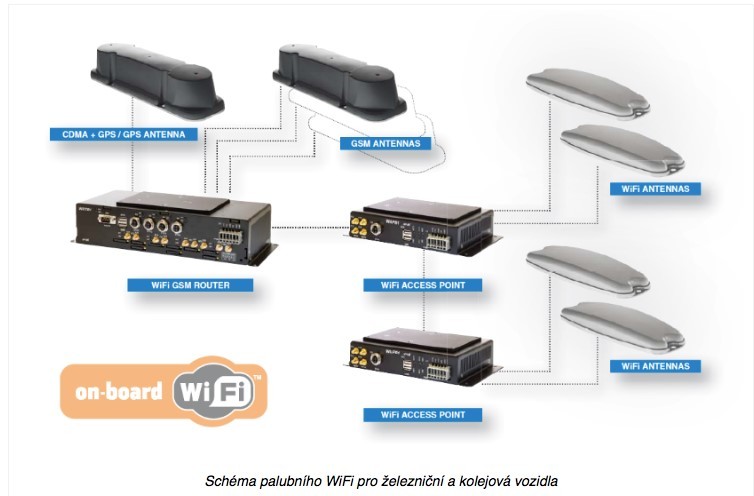
An onboard Wi-Fi system consists of infrastructure made up of LTE routers, access points, antennas and cables. As shown in Fig. 1, the LTE router receives the network signal from the internet provider's transmitters and provides the connection for the train network. To achieve the widest possible coverage, the new LTE routers allow switching between the connections of individual operators. Switching is often used when crossing borders or in other places where the signal is fragmented and the connection fluctuates. LTE routers can also be chained together to achieve greater throughput of the transmitted signal, and thus greater service availability. However, this requires the use of an external server. Wi-Fi access points are connected to the routers and provide internet access for passengers and train staff; these can be chained as well. Several Wi-Fi antennas then provide the connection throughout the train carriages.
Fig. 1 Diagram of the onboard Wi-Fi connection
The onboard Wi-Fi network can be connected to the various networks that operators provide in the Czech Republic, i.e. 2G, 3G and 4G networks (second to fourth generation). It is also possible to connect other technologies, such as a monitoring system, a passenger information system or a reservation system. Solutions are available on the market that also allow redundancy to be configured for the onboard Wi-Fi system. This means that two systems are set up to perform the same task. If one system fails, the other is able to carry on the assigned task without interruption. So if one operator's signal is lost or its network becomes unstable, all user connections can be moved to the signal of other providers without the connections being dropped.
Corridor coverage
In April 2016, the Czech Telecommunication Office (CTU) carried out a measurement of internet coverage on trains. Measurements were taken in the 2G (2nd generation) and especially 4G (4th generation) network bands, using a generator that was tuned to the individual frequency bands. LTE network coverage was measured in the 800 MHz, 1,800 MHz and 2,600 MHz bands. The measurement covered the routes of all four transit corridors.
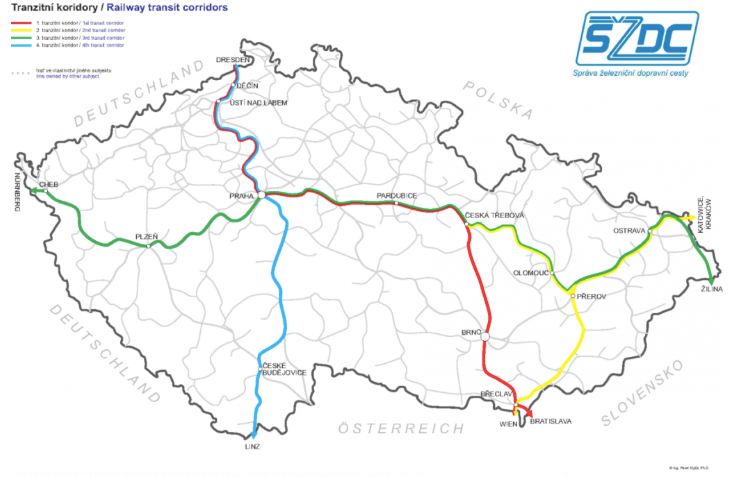
Transit corridors for rail transport in the Czech Republic
- corridor: Děčín – Praha Holešovice – Pardubice – Brno – Břeclav
- corridor: Petrovice u Karviné – Ostrava hl. n. – Břeclav
- corridor: Mosty u Jablunkova – Ostrava hl. n. – Přerov – Praha – Plzeň – Cheb
- corridor: Děčín – Praha – České Budějovice – Horní Dvořiště
Fig. 2: Main railway corridors
Source: https://www.svetandroida.cz/internet-ve-vlaku-201607/
Signal coverage was measured outside the train, so-called “outdoor” measurement, at a height of 4.5 metres above ground. Coverage inside the individual types of carriage was also measured, so-called “indoor” measurement, at a height of 1.5 m inside the carriage.
It turned out that in each corridor there are very few places that have no data signal at all (measured “outdoor”). In the 1st corridor, 0.2% of the route has no coverage, in the 2nd corridor 0.05%, in the 3rd corridor 0.06%, and the 4th corridor performed best, with only 0.01% without coverage.
The measurements also revealed that in many cases coverage is fragmented, with covered and uncovered sections alternating very quickly. Passengers also perceive coverage as lower than what was measured, as shown by the time it takes for devices to connect.
The construction of the railway carriage and how well it lets electromagnetic waves through has a very significant effect on the quality of the connection inside the train itself. That is why measurements were taken inside the carriages as well as outside. There are very large differences between types of carriage. In general, older carriages let the signal through better than new or modernised ones, which dampen it.
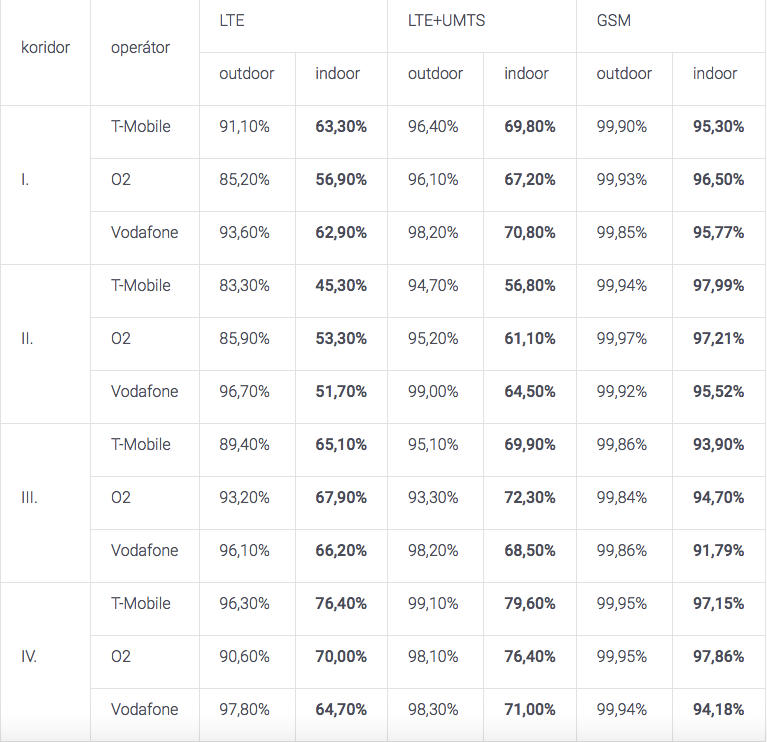
Table 1 shows an overview of coverage on all four corridors for the operators O2, T-Mobile and Vodafone, both for “outdoor” and “indoor” measurements. Coverage is also broken down by network. GSM (Global System for Mobile Communications), a 2nd-generation network, has the widest coverage. However, its data speed is very low and almost unusable. Uploads and downloads hover around 9.6 kbps. UMTS (Universal Mobile Telecommunications System) is a 3rd-generation network. It allows full use of the internet, including larger email attachments and Skype. It enables downloads at up to 2 Mbps and uploads at 100–150 kbps. In the Czech Republic, however, its coverage is relatively small, mainly in regional cities. LTE (Long Term Evolution) sits on the border between 3rd and 4th generation, while LTE-Advanced is a purely 4th-generation network. In the Czech Republic, LTE download speeds can reach up to 150 Mbps and upload speeds 50 Mbps.
As you can see, the 2nd corridor (Petrovice u Karviné – Ostrava hl. n. – Břeclav) has the poorest LTE coverage, with an average of 50% of the route covered, while the 4th corridor (Děčín – Praha – České Budějovice – Horní Dvořiště) performs best, with an average of 75% covered. We want to know whether passengers can really connect on the train, so we look at the “indoor” measurements.
Table 1: Coverage of railway corridors
Source: https://www.ctu.cz/mereni-pokryti-zeleznice
According to the obligation, by spring 2019 operators must cover at least 50% of the length of the train corridors with an LTE signal. Two years later, i.e. in 2021, the corridors must be covered along their entire length. The obligation will be met if the operator ensures a 75% probability of connection inside the train without an external antenna, and an 85% probability of connection using an external antenna. However, the fact that a sufficient signal is measured does not mean that passengers in the train will actually connect (even if the train has sufficient throughput). “Measurements to date show that some operators met the obligation ahead of schedule. But if it were not met within the set deadline, the CTU may go as far as withdrawing the allocation,” says CTU spokesperson Mgr. Martin Drtina.
So even though railway corridor coverage is supposed to reach 100% by 2021, access to mobile data networks will, because of signal damping in the carriages, remain limited for passengers without further technical measures. It must therefore be ensured, for example, by using repeaters (a repeater can receive a signal even in places the main access point (AP) cannot reach. It picks up the signal from the AP and re-transmits it into the air, i.e. repeats the broadcast) or by creating so-called picocells inside the carriages. (Picocells provide mobile data coverage over a wider area. They are used in places with a high concentration of users wanting to connect to Wi-Fi, such as railway stations or shopping centres.)
Internet on trains abroad
Sitting down on a train, getting out your laptop and working for two hours thanks to free Wi-Fi. This picture, which is standard here in the Czech Republic, is not something you see very often in our closest neighbouring countries. In Germany, the internet is available only on Deutsche Bahn ICE lines, and it costs extra. In Austria, passengers can connect for free only on the most modern RailJet trains, which run on just a few lines. Wi-Fi is not available on any other domestic or international trains. The situation is similar in Poland, where only Express InterCity trains, which run between big cities and to other countries, have Wi-Fi. Slovakia is doing better: the company Železničná spoločnosť has offered connections in its carriages since 2013, and, like ČD, it is steadily increasing the number of trains with Wi-Fi. If we move a little further west, France is a good example: according to available information, Wi-Fi connections should be available on all trains from the end of 2016.
Author: Johana Nádvorníková
Updated 19 February 2024