How to measure your internet speed, and what is the speed of the Czech internet, really?
20. 5. 2020
There are so many internet speed testers across the whole world that you could not even count them all. Some operate as standalone services, while others are a handy extra on various news or gaming servers. Among the Czech testers, popular choices include DSL, Netmetr, Kvalitni-internet.cz, adsl.cz, rychlost.cz, Internetprovsechny.cz and others. Among the foreign ones, the very popular Speedtest.net stands out. It is perhaps the most widely used service of its kind anywhere in the world. It has been localised for the Czech environment and works with Czech probes.
What will we actually find out?
The result of a measurement is usually three values: download (downloading data), upload (sending data) and ping (response time). Only the Kvalitni-internet.cz server also measures jitter. The first two values represent the real data transfer rate (throughput) in one direction or the other, i.e. the amount of data that can be transferred over your internet connection to you and from you at any one moment. These values are often very unevenly balanced in favour of downloading, which is the more useful function for the vast majority of ordinary home or business users. Especially if you sometimes enjoy streaming or playing a high-quality online film, play a demanding multiplayer game, or are a frequent user of services such as YouTube, Netflix, Twitch, torrents, various internet TV services and other online sources of large content, then first and foremost you need to download that content to your computer as quickly as possible...
On the other hand, fast uploading is not something you will use much for ordinary web browsing, but you will need it if you have content that you want to share with other online users, for example when uploading videos to YouTube or sending a live online stream. Trends are changing, however, and the demands for upload speed are growing for sharing video content, backing up photos and working with data on remote servers. Users and companies that regularly back up their large volumes of data to the cloud will also make full use of upload. Good upload as well as download is also essential for internet telephony and video calls via Skype or other similar services. With the growth of internet society, the demand for data upload capacity is growing rapidly.
This puts copper networks at a disadvantage, not only compared with fibre, but also with wireless technologies. Modern NGA lines usually have a download-to-upload ratio of 3:1. Be careful, though: this ratio of download to upload is sometimes confused with contention. Contention determines how many customers share a given capacity of an access point.
Response time (ping) measures and tells you the shortest time (or possibly the average and longest time) that has elapsed between sending a small segment of data from your computer and the moment the recipient (the test server) received it. The measured value therefore depends on the quality of the connection on both sides, and it is key especially for online gamers, so that the game moves as smoothly as possible in real time and without waiting. If the game server registers the press of a shooting button in an online game only after 150 ms, the target is usually long gone from that part of the screen and you will miss. To check ping, you can use tools in your operating system. In Windows, enter the command cmd.exe. In the black terminal window, type the command ping www.uvtnet.cz -t and press Enter.
On the Kvalitni-internet.cz speed test you can also find out the size of the fluctuation in the line's delay, the jitter. Such a measurement, however, is of interest mainly to extreme gamers.
Measurement methodology of speed testers and their accuracy.
Speed testers provide their operators with data on the quality of connections in the network, and they are a service for customers. Some servers compile representative statistics from the results, which reveal problems in the networks of individual providers. For the most part they measure accurately, their methodology is sound and they have decent measurement accuracy. The measured line parameters are defined against a software probe, which is usually installed in the backbone connectivity of the providers of internet access in the Czech Republic. It does not introduce errors by transporting measurement packets to distant parts of the planet. Even the widely used foreign Speedtest.net uses Czech probes and provides measurement data for the Czech Republic. A good measurement methodology is provided by all applications based on the modern HTML5 protocol, for example Kvalitni-internet.cz, or NetMetr from the CZ.NIC association. Both of these applications offer a preview of the measurement map.
Testing works by sending samples of a data cluster of a defined size to the measuring probe and evaluating the times of their delivery. Internet speed testers examine data clusters of various datagram lengths in order to simulate all kinds of traffic. This causes slightly different results when measuring from different browsers. Each browser in use, such as MS Edge or Google Chrome, handles HTML code slightly differently. The Internetprovsechny.cz and Speedtest.Net speed testers use JavaScript, but this could cause problems for these providers in the future. Java will not be supported automatically in future browser versions. That is exactly why an HTML5 clone of SpeedTest.net from OOKLA was released, so far only as a beta version.
Statistics of the Czech internet.
Measurements of home line speeds are made by speed testers, and anonymised statistics are also provided by content providers besides the speed testers. For example, when you update your system, such as macOS or Windows, the data is sent from Akamai's CDN server. These updates are managed by network logic, which does not allow downloading if the server does not have enough free system resources. Akamai uses the full capacity of the line, and its annual reports comparing internet speeds around the world, the Akamai State of the Internet, are much appreciated by experts from all over the world. The Czech Republic is regularly among the fifteen fastest countries in the global view. We are not doing badly at all. By contrast, the statistics published by Seznam.cz in its Mapa rychlosti internetu (Internet Speed Map) application show considerably lower figures.
This is understandable: as with a measurement triggered in a speed tester, external influences are to blame. Seznam derives the speed from the capacity of data sent from Stream.cz servers. A typical consumer of internet entertainment is sitting somewhere quite different from where the home WiFi router is located. Behind several flat walls, the speed of the connection is degraded by a loss of signal quality. Seznam measures the chosen quality of the streamed video, and even a very high-quality HD picture does not exceed a 10 Mbps stream capacity. 4K video in the HEVC codec requires 18.4 Mbps of the line's capacity. But Seznam does not provide video of that quality.
How much bandwidth do individual services actually use on a home line?
Here is an example of the estimated data usage for selected services:
- For voice calls: download 0.1 Mbps, upload 0.1 Mbps
- For video calls: download 0.5 Mbps, upload 0.5 Mbps
- For high-resolution video calls: download 1.5 Mbps, upload 1.5 Mbps
- Netflix on PC: download 1.5 Mbps, with HD quality turned on 5 Mbps
- YouTube on PC: download at least 0.5 Mbps for the lowest quality, with HD quality turned on 5 Mbps
- Full HD channel of internet cable TV (IPTV): 8 to 10 Mbps, depending on the codec used. IPTV platforms reduce picture quality when the line is overloaded. The minimum that can be labelled as HD is 4.5 Mbps.
- SD channel of internet cable TV (IPTV): 1 to 3.5 Mbps, depending on the codec and the policy of the service provider.
How to make sense of speed units
Today, the speed of a broadband connection for a household or business is commonly advertised and measured in Mbps, which means megabits per second. Mbps is the standard that lets you easily compare your result with the speed of another broadband connection. But let us also mention the other units in use.
- kbps (kilobits per second) – One kilobit is 1,000 bits, and bits are the smallest possible unit of information (0 or 1). This unit used to be used for dial-up connections via modem and later for mobile devices with slow connections, but today it is almost never used.
- kBps (kilobytes per second) – Bytes are made up of eight bits, so one kilobyte equals eight kilobits. The size of files on a computer is usually measured in bytes, so in practice you will usually see kilobytes, for example in user applications for downloading data. Bytes are written with a capital B in abbreviations to distinguish them from bits, as both begin with the letter b.
- Mbps (megabits per second) – Today the most widely used unit for expressing connection speed. 1,000 kilobits make one megabit.
- MBps (megabytes per second) – Eight megabits make one megabyte. The size of most files on a computer is measured in megabytes, and if you have a fast connection, you will also see this unit in user applications for downloading data.
If you compare the measurement of one connection's speed with another measurement, make sure that both use the same unit. Otherwise you will not reach a comparable level, and the figures may show much lower or higher numbers than you expected.
How to measure on a mobile device
On mobile devices you can measure directly in browsers; in most cases the pages are fully responsive. For Android and iOS, the NetMetr and Internetprovsechny.cz apps are available. The advantage is testing the properties of the line, such as IPv6 protocol support, proxy transparency and UDP packet support. For everyday work you do not need to know these line properties, but for gaming servers it is a crucial parameter.
Keep in mind that testing has its own data requirements, and frequent testing of your connection may use up the fair use policy (FUP) allowance of your mobile plan.
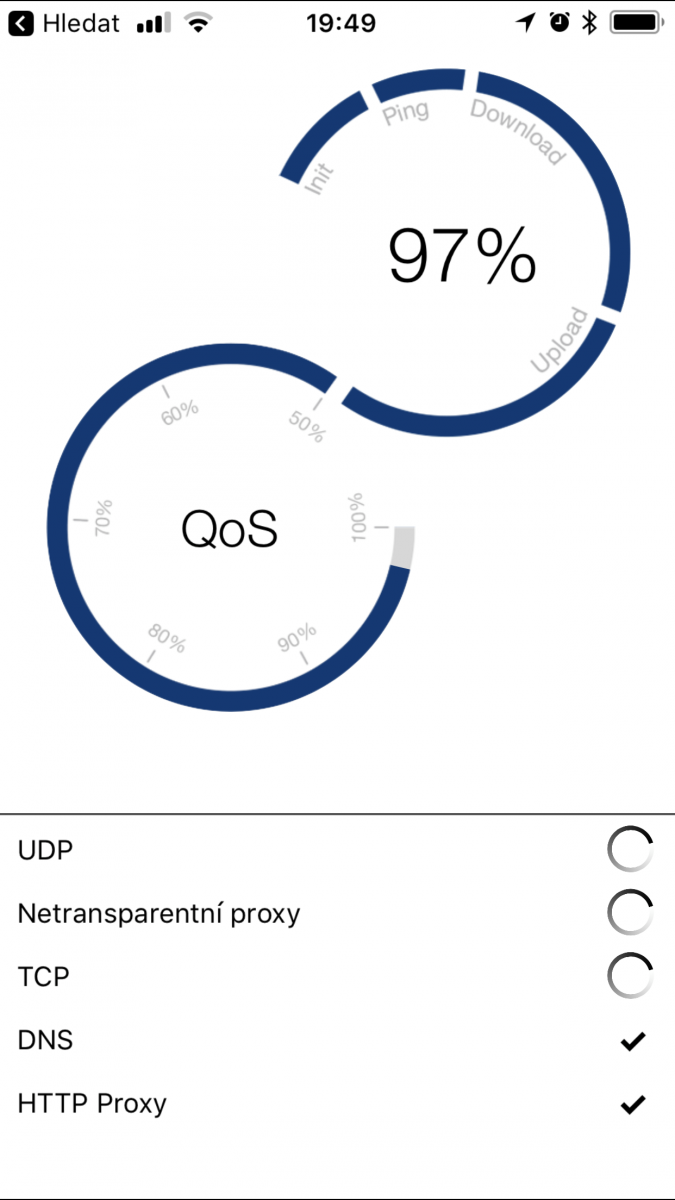
Speed testers on the internet
To eliminate distortions of the measurement caused, for example, by a momentary overload of the test server, the software measuring probe is placed on a separate, top-end standalone server connected by a network card with a 10 Gbps optical interface. The Kvalitni-internet.cz server is located in the backbone connectivity of 2Connect.cz. The server located in the backbone connectivity of the Fénix project, with a 10 Gb interface, evaluates the number of measurements and does not allow the line to be overloaded. For other probes you can run several measurements and compare their accuracy, if you manually choose a different measuring server.
A last piece of advice
Some providers recognise communication to the IP addresses of speed testers and give them absolute priority over other packets in the network. If you are unsure about the result, try more test servers.
links: www.internetprovsechny.cz, www.netmetr.cz,http://beta.speedtest.net/ with the option to configure
probes on uvtnet.cz
Author: Lukáš Beňa, Jakub Moník
You might also be interested in





22. 5. 2020
Coronavirus and its impact on technology and digitalisation – interview with VNICTP president Jakub Rejzek
Whole article

22. 5. 2020
How the SledovaniTV service developed – one of the oldest IPTV services in the Czech Republic
Whole article
22. 5. 2020