Secure communication with an AI-powered DNS resolver
20. 5. 2020
Nowadays, almost everything important is connected to the internet. Even devices that once needed no connection at all now come with a data connector.
A reliable internet connection for households means entertainment, education, internet cable TV, the ability to control a thermostat remotely, or to secure a flat or house. This is the fourth industrial revolution, but alongside its opportunities it also brings risks.
Global internet traffic is complex. It is an open structure, and anyone can communicate with anyone else. Various organisations with bad intentions take advantage of this. Their aim is to break into the computer of any one of us and use artificial intelligence to find valuable data. Criminals also try to take over home networks so that they can use them to covertly spread their code around the world. There are so many possible threats, but every piece of malware needs to communicate out of the infected network. It wants to take control of our networks, yet it still has to communicate out of them. And here lies its weakness.
TIP: Also read our article DDoS attacks and Project Fénix
How does household communication work?
To understand the key to internet security, it is necessary to describe in simplified terms how household communication works. The operator cannot legally analyse too much of the data you download from outside, including risky data. Unless it is an obvious attack, the operator must not block incoming communication without the customer's request. It is up to the customer whether they set up an effective firewall, and whether they have an updated operating system and antivirus programme installed.
Every home router directs outgoing communication to its operator's DNS server. Such a device translates domain names into the IP addresses of target servers, thus making it possible to route communication to the target address. All communication passes through the DNS server, even the communication of hidden malicious code in a home computer or a security camera.
The Czech company Whalebone, supported by the Czech Technical University in Prague, is researching ways to use artificial intelligence to protect households from the consequences of computer network infections. It has developed a neural network that automatically detects DGA communication in operators' DNS traffic. Combined with continuous sharing of threat data with other security organisations, this represents an absolute top-level protection for users. It is not effectively possible to respond to threats generated automatically by AI bots without fighting fire with fire. The Whalebone neural network uses artificial intelligence to create a very precise list of the target addresses that various viruses use to communicate from an infected device. Using automatic recognition of features common to the communication of malicious code, Whalebone either blocks it, or offers the administrator the option to block data sent from infected devices. Artificial intelligence combines knowledge of already described threats with the millions of data points that this neural network reads from the traffic it monitors.
It passes the evaluated data directly to the DNS resolver, which blocks communication and the spread of viruses across the internet with incredible accuracy.
The attached graph shows the number of queries from one network segment.
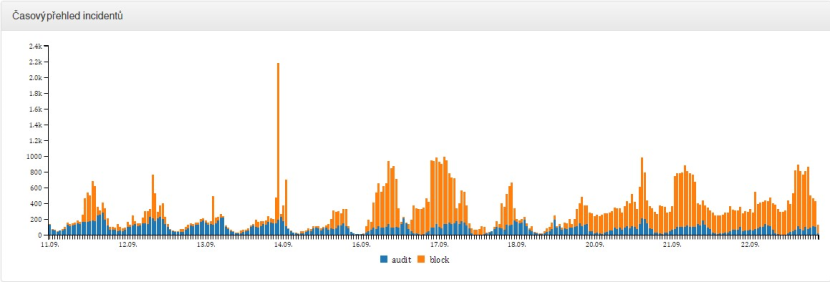
Between 11 September and 23 September, 30,000 queries for malware were detected, queries for threats evaluated as bots taking control of a computer numbered 68,000, and the operator's customers narrowly avoided falling victim to a phishing attack 1,000 times in total. It is true that the graph dates from a period of peak botnet traffic. But every further graph shows that security measures are in place in households too.
Would you like to find out whether your IP address has ever been used for bot communication and whether such communication was evaluated as risky? You can test your IP address here, https://amihacked.turris.cz/. Internet security is also the concern of the Turris project from CZ.NIC, the association that administers Czech domains.
In a later article, we will look at the home firewall and the options for preventing infections. Especially as the number of devices and services that all of us use keeps growing, the method of stopping communication from spreading is the most effective. We are protected by artificial intelligence, a neural network that analyses all threats in the traffic and protects us in the background, without reducing comfort when using next-generation internet services.
Glossary:
Denial of Service (DoS)
A type of attack on an internet service, the aim of which is to take that service out of operation. This aim is often achieved by sending a large number of requests to the service, or by exploiting a flaw on the service side. A distributed version of this attack (DDoS), which uses a large number of dispersed machines, is often used. In traffic, a frequent indicator is a large number of requests (a hundred to a thousand times the normal volume) within a short time (a few hours, or at most a few days).
DDoS Slow drip
This type of attack uses a large number of machines to send a relatively small number of forged queries to target servers. The attacker buys the domain xyz.com and points the name server records of that domain to the victim (kvalitni-internet.cz). The query is sent to the default DNS resolvers of the infected machine. The resolvers then contact the name servers managing the target domain (xyz.com). The infected machine generates an attack on a large number of random, non-existent second-level domains (sdvpanva641vd.xyz.com). The first to receive this query is the cache of the DNS resolver, which does not have these records logged. Therefore, the resolvers must query the authoritative name servers of the given domain (xyz.com) further, thereby overwhelming the name servers of kvalitni-internet.cz, which are unable to respond. The resulting response is therefore SERVFAIL (the resolver is unable to satisfy the client).
Domain Generation Algorithms (DGA)
Botnets based on Domain Generation Algorithms (DGA) find their command-and-control (C&C) server by generating a set of domains that can change over time (typically generated daily). The botnet owner registers one of these domains in advance, thus ensuring that the infected machines are able to contact the C&C server and receive new instructions.
The Whalebone neural network detects randomly looking domains, e.g. ywhwroqfqd.com, ysxmushmjr.info
Botnet
A group of infected and taken-over machines that are controlled from a command centre (C&C), used for DDoS attacks, sending spam, attacks on bank accounts and so on.
Updated 16 February 2024

You might also be interested in


9. 9. 2026
Two-factor authentication: the safeguard that works even if someone steals your password
Whole article








22. 5. 2020